Project context and our role
This case study describes the WP Growth Labs website itself. It is our own brand website, not a client engagement. The implementation combines a custom WordPress theme, Advanced Custom Fields, native articles and a portfolio gallery.
The work covered responsive page templates, structured content, editor controls and a route for visitors to discuss projects. This article documents the implementation that can be inspected on this site. It does not claim a sales uplift, client endorsement or measured growth in search traffic.
The challenge: flexibility without repeated content
The site serves two audiences: agencies with designs to implement and business owners planning a website. It needs distinct service information, shared proof and practical guides, while keeping editing understandable.
The homepage needs a short selection of projects, while Our Work needs a larger searchable gallery. If each page held its own complete project copy, an editor would have several versions of the same title, category or website link to maintain. That was a content-model risk to address, rather than a reason to give every page the same content.
Hardcoding every paragraph would make routine updates depend on development. Giving every item unrestricted layout controls would also mix content changes with design decisions. The implementation needed to separate shared project information, page-specific copy and the rules that present them.
The content structure
Core pages use ACF sections matched to their layouts. A hero, a group of service cards and a process section have different editing needs, so they use focused fields rather than a single large content box.
- Page sections own their headings, introductions, links and lists.
- Portfolio projects are shared records reused by the curated homepage and the full gallery.
- FAQs use shared records where the same answer is reused.
- Long-form guides use native WordPress Posts.
- The team page groups its introduction, people and call to action.
This division means an article can be edited as an article, while a service page retains its designed structure. The portfolio gallery links visitors to the listed live websites; those links do not establish a claim about every part of those projects.
One project record, two ways to display it
A project lives in WordPress under Featured work. The homepage and full gallery read that shared record rather than maintaining separate copies of its details. The current responsibilities are:
- Project record: owns the title, description, featured image, category, technology and filter labels, and live website URL.
- Homepage selection: lets an editor choose a short featured list and its order.
- Full gallery: obtains published Client project records automatically, newest publication date first. A record needs a title and a valid HTTP or HTTPS live-website URL to produce a card.
- Theme template: renders those records as cards. The same rendered set supplies the gallery count, filters, search and Load more.
In our 7 October 2026 review, Home selected six project records and Our Work selected 48. The six homepage records were also selected in Our Work; their record identifiers, titles, labels and destination links matched across both pages. These are counts of displayed records, not a claim about delivery responsibility for every external website.
A service introduction has a different owner: it belongs to its page’s Hero section. It does not need a shared project record. The editing task below shows how that page-specific content uses one field across desktop and mobile.
The editing approach
The section editor includes navigation for the sections on the current page, section previews and separate content and settings controls. Repeated cards use repeatable fields. These controls make the page structure visible to the editor before they open every field.
One implementation detail is the handling of optional content: an empty value needs to remove its own output without bringing back old placeholder copy. Responsive review also needs realistic headings and lists, because short demonstration text does not reveal wrapping problems.
Changing a record versus changing a selection
To correct a project’s category or website link, edit its Featured work record. To choose a different homepage selection, edit the homepage’s selected projects. For the full gallery, publish the approved record with Project type: Client project, a title and a valid Live website URL. The gallery then includes the eligible record automatically; the editor does not need to add it to a second manual list.
This structure gives editors a defined place to maintain project details. Our review confirmed the selected records and their rendered output; it did not measure time saved or the rate of editing mistakes.
A theme dependency to plan for
In this implementation, the custom theme registers the project content type and renders its records. Replacing that theme therefore requires planning how those features and field definitions move to the replacement. Storing structured content does not by itself make every template portable.
The right editing approach depends on the changes a team needs to make. Our Elementor and ACF comparison explains the difference between visual layout editing, structured fields and a combined approach.
A concrete editing task: update a service introduction
In the ACF service page’s Hero section, the Introduction field owns the opening paragraph. The screenshots below show a real editing demonstration on a duplicate draft of our own website, captured on 7 October 2026. This is not a client project.
We saved this example in that field:
Edit this introduction in one place. The WordPress template keeps its layout consistent on desktop and mobile.

The template displays the saved paragraph beneath the heading. Its typography, spacing and responsive layout stay in the theme; the editor does not maintain a separate mobile paragraph.
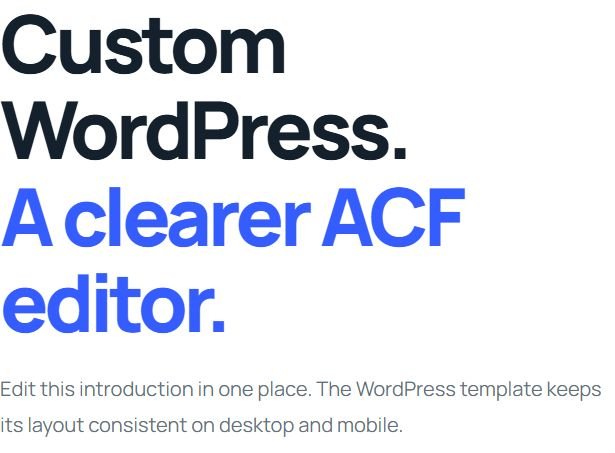
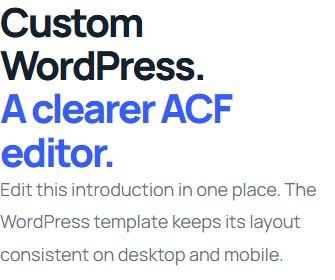
We also saved short, long and empty values on the draft. The long paragraph wrapped without horizontal page overflow at the checked 320, 390, 768, 1024 and 1440px widths. Clearing this optional field removed its paragraph; restoring the original content brought it back. The live service introduction was not replaced by the demonstration text.
This is one observed editing task on this theme. A project’s fields and layout rules should follow the content its editors actually need to manage.
Can an editor update this ACF page without changing code?
For the introduction shown here, yes: the editor changes one saved text field. The theme places that value beneath the heading at both desktop and mobile widths. Creating a new section design or changing its rendering rules is a separate development task. The useful handover question is which everyday changes the supplied fields actually support.
Does an ACF website need separate mobile content?
This example uses the same introduction on both screen sizes. Responsive rules in the theme handle its width, spacing and wrapping. We checked short, long and empty content on a duplicate draft; those results apply to this field and template. New images, longer headings and other sections still need their own preview checks.
What should the editor receive at handover?
A practical editing guide should name the field to change, show the expected result and explain which changes need a developer. It should also identify the people responsible for backups, updates and checking enquiries. Use our WordPress website handover checklist to turn those responsibilities into a project-specific review.
An accessibility issue found in the animated text
The homepage’s agency paragraph uses a word-by-word highlight animation. A PageSpeed check found that the animation library added an aria-label to a paragraph, where that naming attribute is not permitted. It also hid the individual words from the accessibility tree.
The correction kept the paragraph and its word spans readable, disabled that automatic ARIA labelling, and updated the script version so browsers could fetch the change. A fresh mobile and desktop report on 4 October 2026 passed both applicable Agentic Browsing checks. See the recorded PageSpeed report.
This is a specific implementation check, not a claim of complete accessibility compliance. The report still identified colour-contrast work, and its lab results do not establish search rankings or real-user performance.
A later targeted review on 7 October corrected eight low-contrast text instances and checked the affected colour pairs. It also addressed the signed-in mobile menu on short screens and the homepage navigation when JavaScript is disabled. Those follow-up checks do not constitute a new PageSpeed score or a complete accessibility audit.
15 October 2026: illustration contrast follow-up
A later homepage review found pale labels in the decorative code and business illustrations. We adjusted the affected small text to #596b73, a measured contrast ratio of 5.56:1 against white. This was a targeted colour change; the page copy and illustration structure stayed in place.
The 15 October PageSpeed report returned 100 for performance, accessibility, best practices and SEO on both mobile and desktop. These are dated automated lab results. Real-user performance data was unavailable, and the scores do not establish complete accessibility, indexing, rankings or sales.
What we checked
Shared records and gallery behavior
On 7 October 2026, we compared the actual WordPress page selections with the public cards and checked the gallery in the browser:
- Home’s six selected project IDs and Our Work’s 48 selected IDs matched the cards rendered on their respective pages.
- Our Work initially showed 12 of 48 projects. One Load more action revealed 24 of 48.
- Searching for Sydney found a project outside the first visible batch. Clearing the search restored the initial 12-project view.
The full selected gallery was present in the server-rendered HTML. Search operated across those records, including cards not yet visible in the first batch. These checks describe the observed content and interface behavior at that date; they do not measure enquiry quality, sales or search performance.
20 October 2026: keeping the full gallery current
A later review found that the full gallery still used its original 48-record selection after more portfolio records had been published. Three records also retained the Illustrative concept type. This showed a practical limitation of a manually maintained full-gallery list.
We changed the full gallery to use the published Client project inventory and corrected those three record types for the founder-identified portfolio work. The homepage retained its curated selection. The old full-gallery selection values were preserved, but the redundant editor control was hidden.
- The live Our Work gallery contained 54 distinct eligible records in the 20 October check, with 12 visible initially. This is a dated content count, not a claim of 54 projects delivered solely by our team.
- All 54 cards were present in the server-rendered HTML. Search could find records outside the first visible batch, and Load more displayed further groups of 12.
- Private-preview checks covered the previously missing records, technology filters, no-results behavior and the final partial batch. Live searches and responsive checks followed publication.
The lesson is to choose selection rules around the editor’s task: a homepage needs deliberate curation, while a complete gallery needs a defined publication rule. The checks above establish the observed behavior of this implementation; they do not establish sales, search rankings or time saved.
Earlier performance snapshot
The build records include review of page templates, responsive layouts, portfolio behavior and content editing. A public technical audit on 4 October 2026 found that the homepage, agency page and portfolio page each returned a mobile Lighthouse performance score of 98 in that test run.
That is a laboratory snapshot, not a field Core Web Vitals result or a guarantee for every device. Later content changes, hosting conditions and third-party code can change performance. The audit also found search metadata and archive-indexing work to improve, which informed the next release.
The useful lesson for a new project
Start the brief with the editor’s tasks as well as the visitor’s journey. Decide which content is shared, which layouts repeat and what an editor must be able to change. Those decisions make the choice of fields and templates easier to review.
For an agency build, also decide who maintains each shared record, who chooses where it appears and who approves changes. Our white label WordPress development process explains client ownership, shared reviews and a scoped first pilot.
See our custom ACF WordPress development service for the approach, or use the WordPress brief template to outline your own requirements. The development process explains how scope, review and handover fit together.

WordPress development for agencies and growing businesses.